Intro
This post is a departure from the usual blog topic of graph algorithms to another network-related topic: transit timetables. During the time I have spent in Japan, one thing that struck me was a timetable format that I had never seen before.
These timetables can be found at stations on many Japanese railroad, metro, and bus systems. I thought they were efficient, and that the format could work for transit systems outside Japan. The product of this idea is a web app that generates departure timetables in this Japanese format for all stations on the Long Island Rail Road (LIRR), the busiest commuter railroad in North America.
Background
The Japanese format
Japanese rail timetables are often presented in a format in which hours are shown on the left, and the minute of each train’s departure during that hour is shown in a row to the right of the hour. Above or below this minute value, additional information may be shown, such as whether the train is express, where it terminates, or whether it has reserved seating.
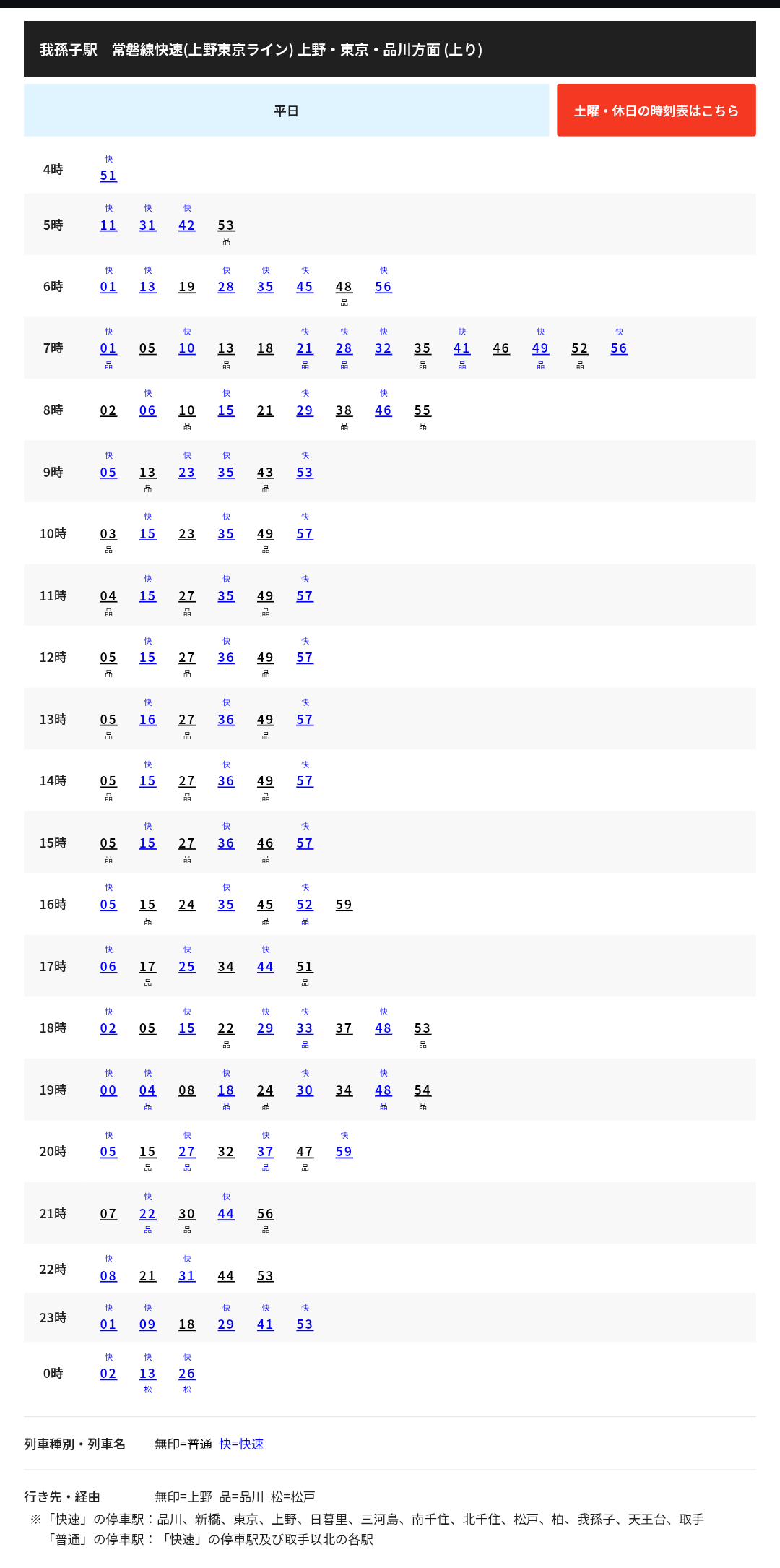
JR East’s weekday timetable for Abiko Station, Joban Line Rapid toward Ueno, Tokyo, and Shinagawa. A mark above a minute shows the train type (快 is rapid); a mark below shows its destination (unmarked is Ueno, 品 is Shinagawa, 松 is Matsudo). Timetable: JR East, Abiko Station, timetables.jreast.co.jp.
As someone interested in transit networks, I wanted to make this kind of timetable for the LIRR.
The LIRR network and the destination problem
Japanese timetables already handle trains with different destinations. From Tokyo, the Chuo Line (Rapid) has 11 destinations on weekdays, but it runs as a single line all the way out to Tachikawa, where the Ome Line branches off; its other branches, at Otsuki and Shiojiri, are farther out still. But the LIRR branches far more, and close to its western terminals: the Port Washington Branch splits off before Jamaica, and from Jamaica, trains go to 16 destinations on 8 major branches, most of which separate from the main line soon after. So a timetable for the LIRR has to show where each train goes.
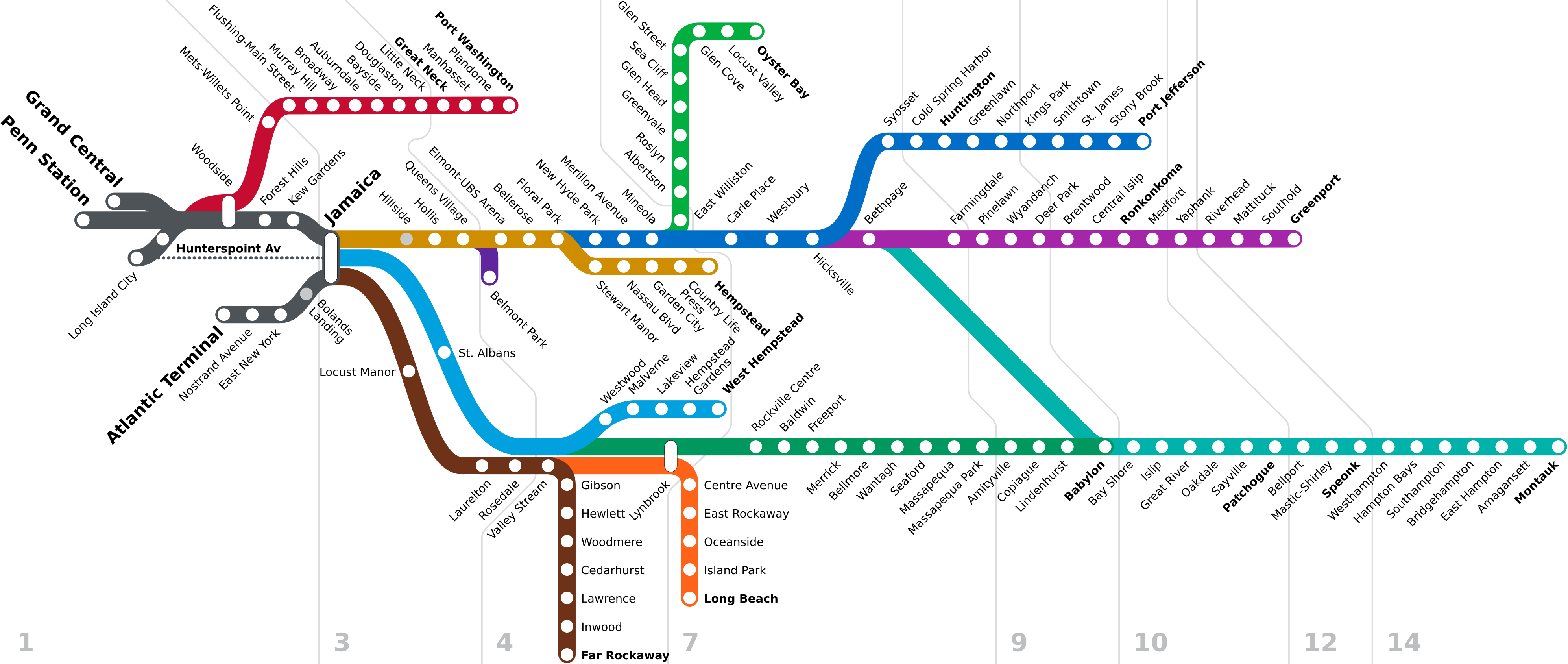
A schematic of the LIRR: each color is a branch, fanning out east of Jamaica. Diagram: “LIRR schematic” by NE2, updated by ComplexRational (2023), Wikimedia Commons, public domain.

A route diagram of the Chuo Line (Rapid) from Tokyo to Otsuki. The Ome Line runs Chuo Line (Rapid) service after branching from the Chuo Line at Tachikawa. There are two other branches that exist beyond the edge of this diagram. Diagram: “Chuoline rapid” by Nullport (2008), revised by S.S.Exp.Hashimoto, Wikimedia Commons, public domain.
This much branching calls for a different kind of visualization from the one typically used on Japanese timetables. The Metropolitan Transportation Authority (MTA) color-codes the LIRR’s branches, so signage for a destination bears the color of its branch. In my departure timetable web app, I follow the same convention. The overhead departure board that was removed from Penn Station in the early 2020s shows it well.
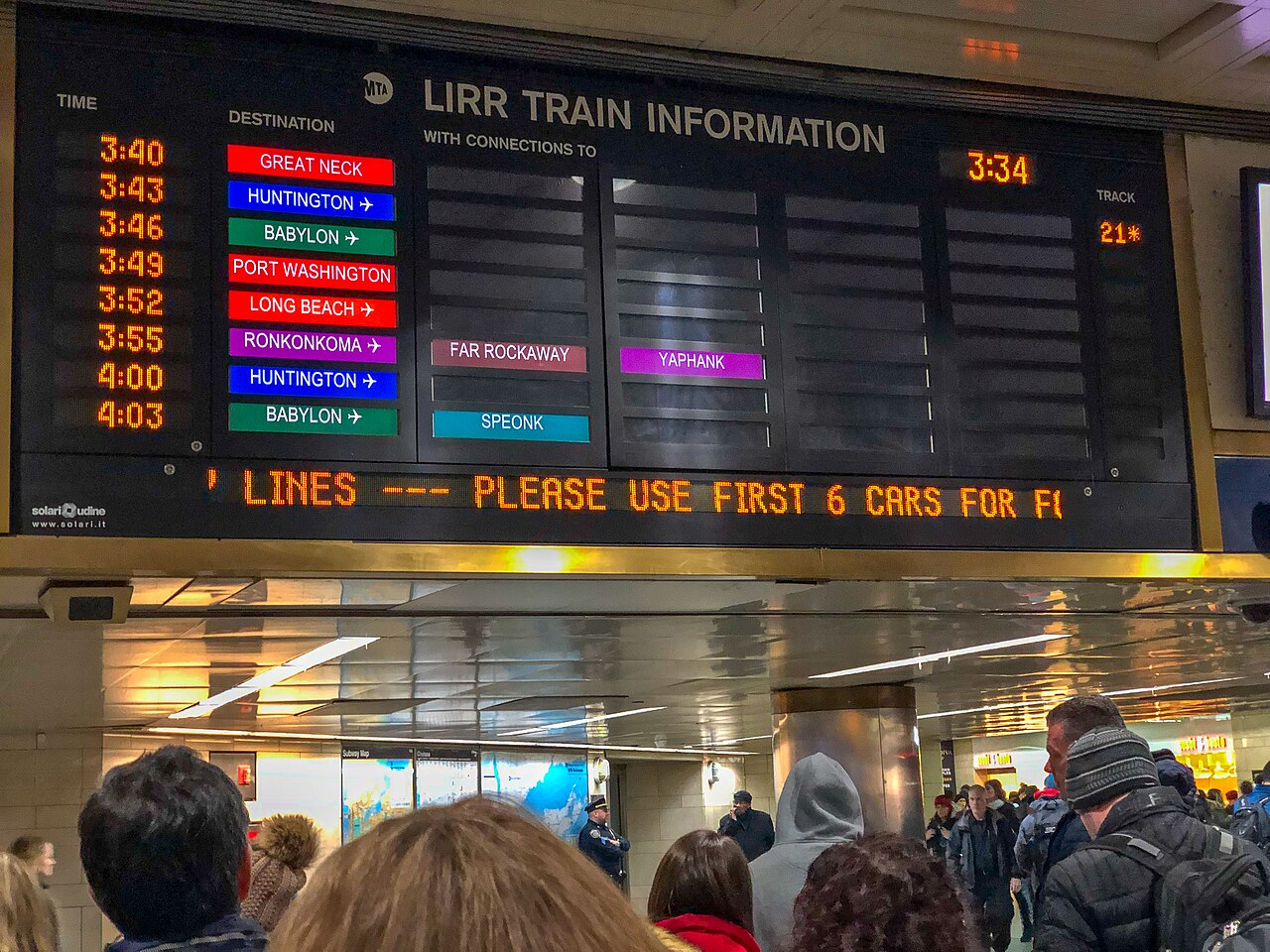
The first train, a Port Washington Branch train, terminates in Great Neck before reaching Port Washington. Another train with the same color later runs all the way to Port Washington. (Long Beach bears the orange color, which looks similar here.) Similarly, a Ronkonkoma train terminates in Ronkonkoma about 80 minutes after departure, where passengers can soon meet another Ronkonkoma Branch train bound for Yaphank. Both of these are colored purple. (About 20 minutes after departure, the Ronkonkoma train also has a timed transfer with the brown-coded Far Rockaway train at Jamaica.) Photo: “LIRR Train Info board in Penn Station New York” by Bonnachoven (2019), Wikimedia Commons, public domain (CC0).
Using the board
Now, on to using the timetable generator.
After navigating to the website, you will get a screen asking for an origin station. Say you pick Woodside, a station in western Queens about 10 minutes from Penn Station. Start typing “wood” in the search bar, and Woodside will appear. Or you can skip typing and scroll to W near the bottom of the page, since the stations are listed alphabetically.
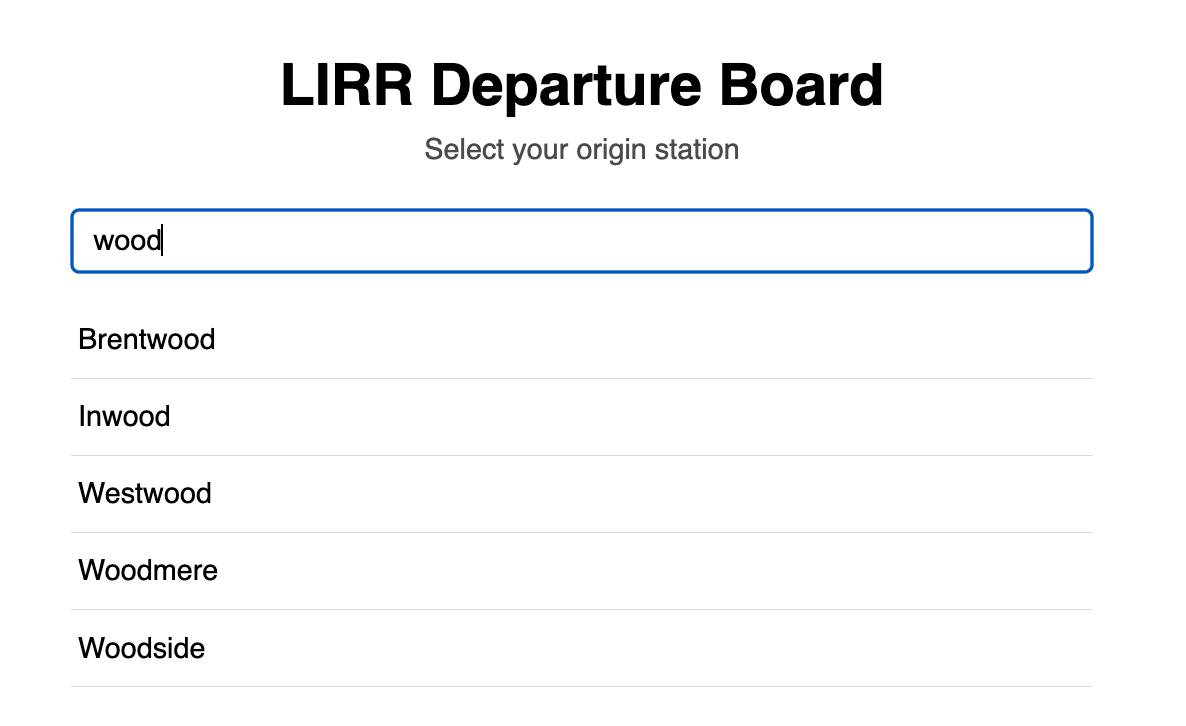
Typing “wood” on the home page lists Brentwood, Inwood, Westwood, Woodmere, and Woodside.
Clicking Woodside loads its timetable. You can then use the search bar again to find destinations reachable from Woodside. Let’s try Great Neck.
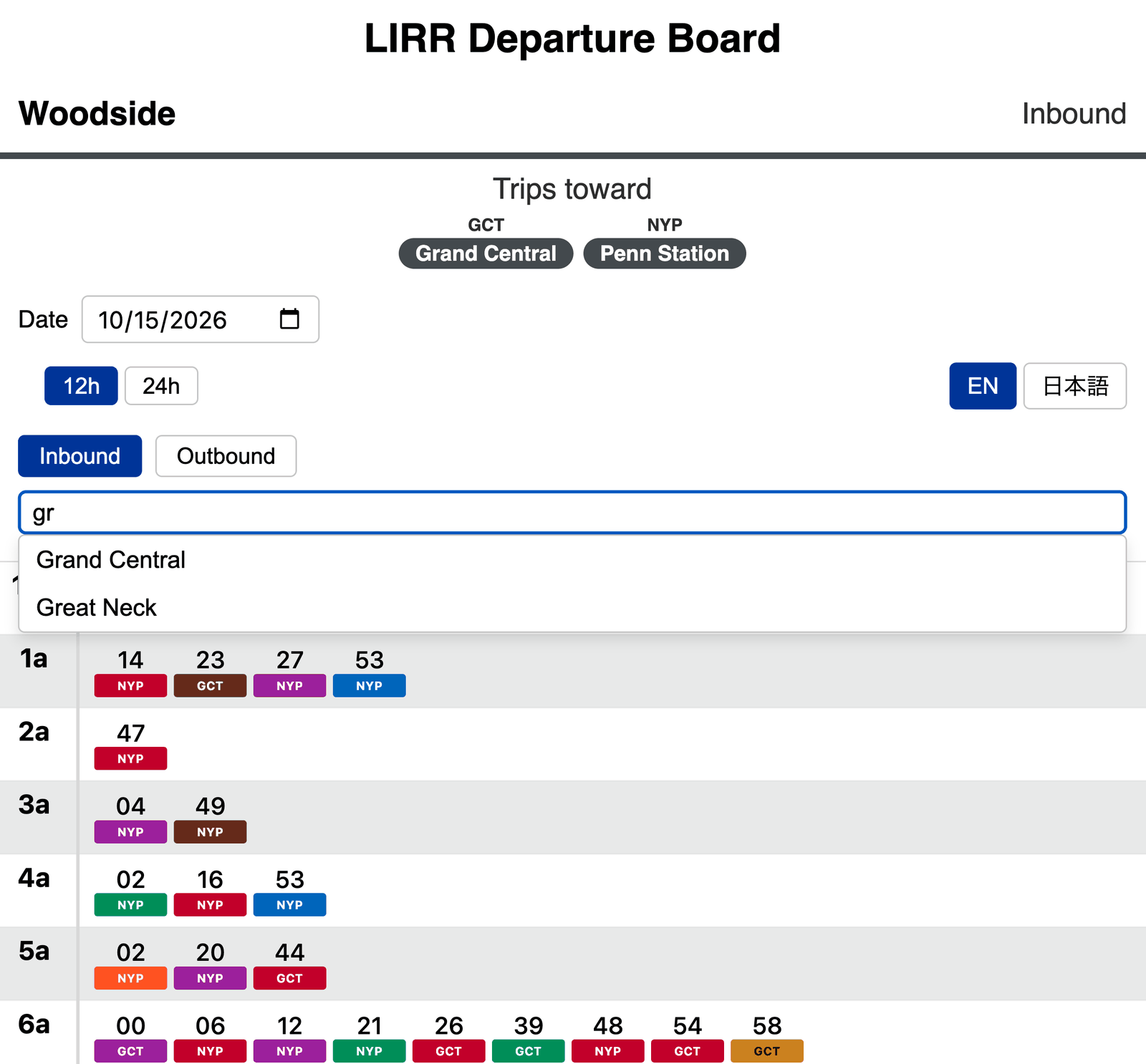
From Woodside, typing “gr” in the destination search offers Grand Central and Great Neck.
As the Penn Station board pictured earlier suggests, all of the departures from Woodside to Great Neck terminate at either Port Washington or Great Neck.
The app is coded so that when a terminus makes up more than two-thirds of departures, it is left unmarked on the timetable.
The header shows that these unlabeled departures terminate at Port Washington, while departures with a red indicator pill labeled GNK terminate at Great Neck.
Also, just like the earlier overhead board, this board uses a red color scheme for Port Washington Branch destinations.
Since this timetable deals only with Port Washington Branch trains, most design elements share the red theme.
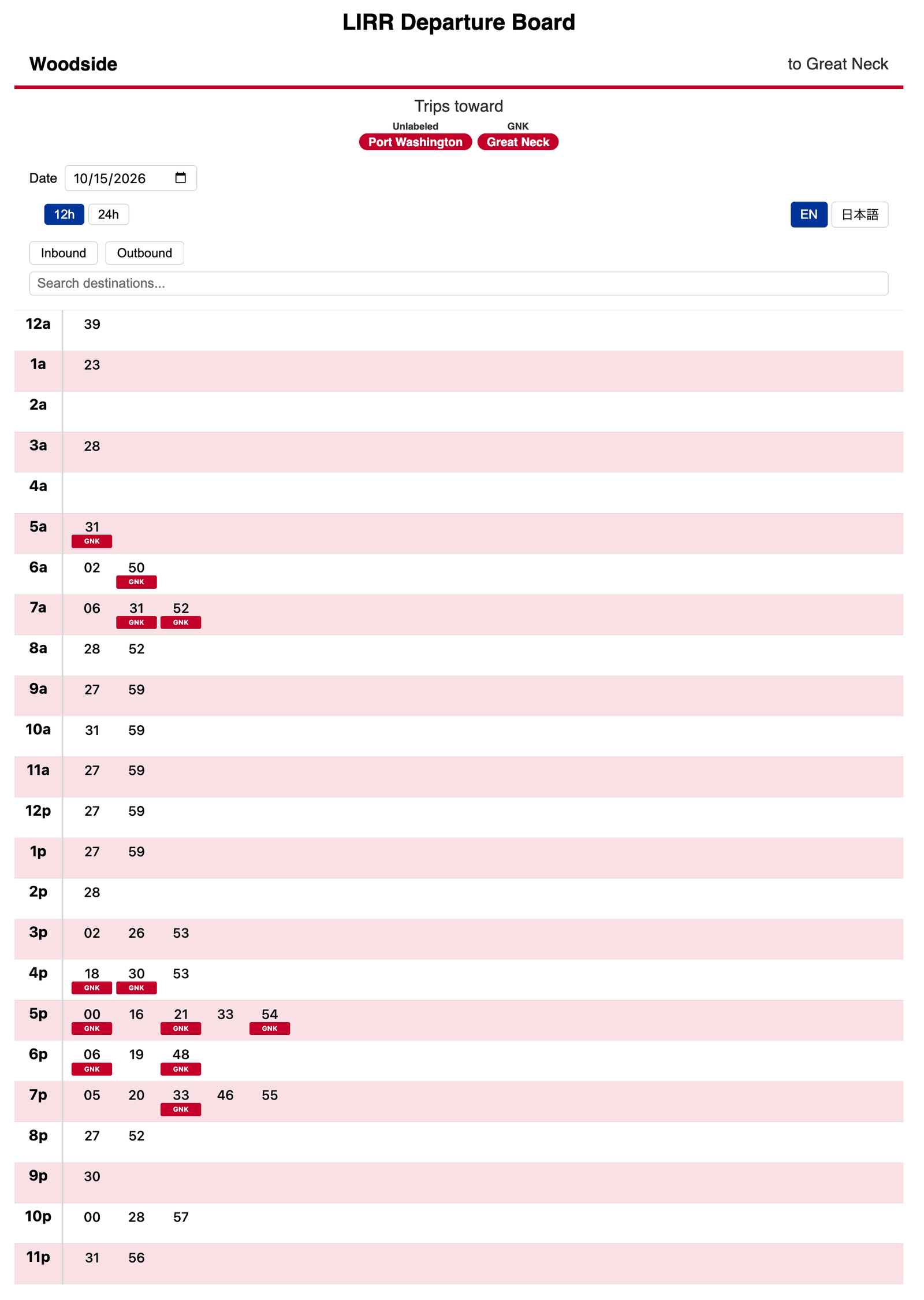
Woodside to Great Neck. Unmarked departures end at Port Washington; departures with a GNK pill end at Great Neck.
More in keeping with the spirit of a departure timetable, you can also click the Outbound button to choose only outbound trains from Woodside. Like a typical Japanese departure timetable, this view shows every outbound train from Woodside on a given day.
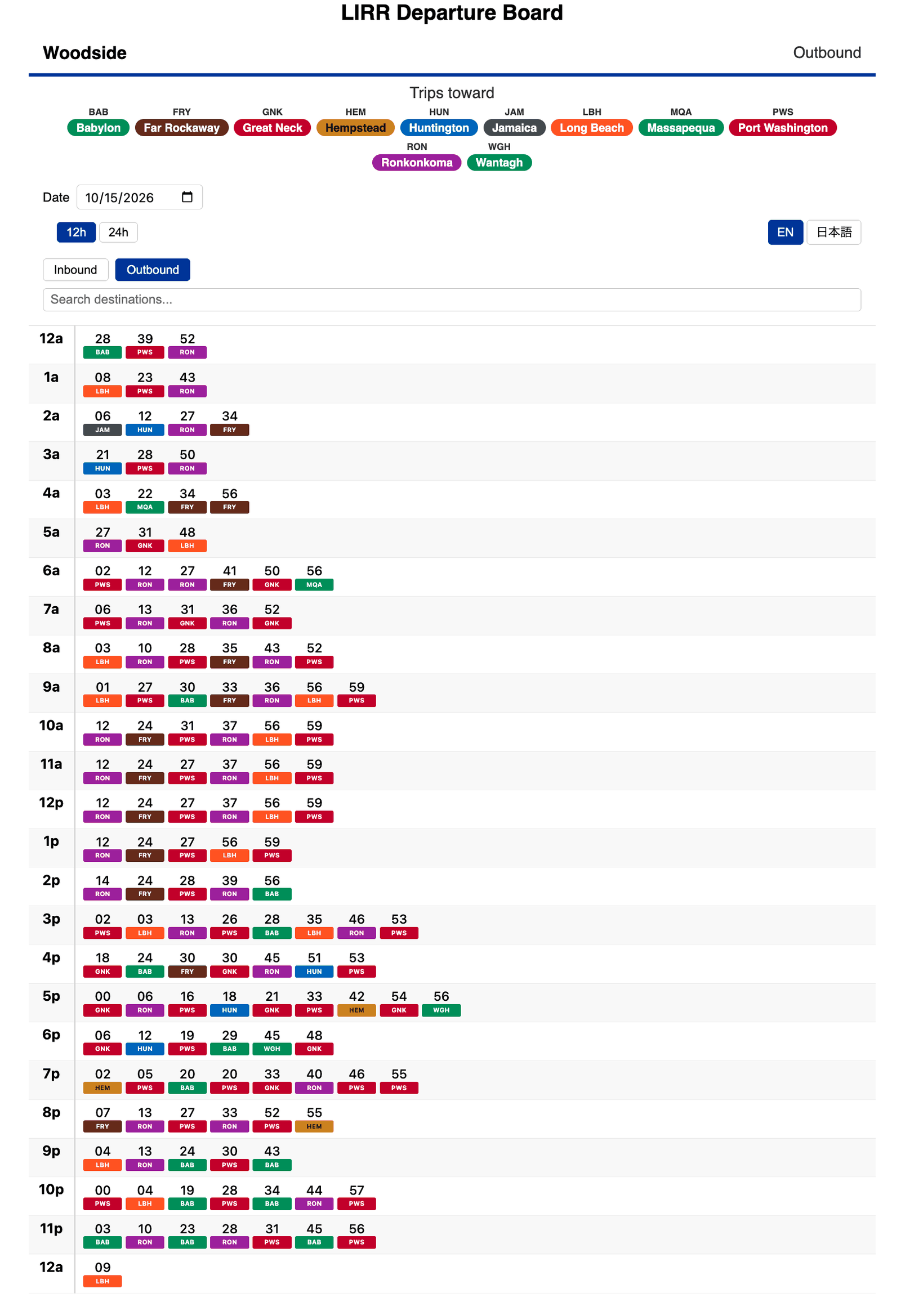
Every outbound train from Woodside, with each pill colored by its branch.
Here, the red accenting is gone, replaced by the rainbow of colors representing LIRR branches.
How it’s built
- OneBusAway server: OneBusAway is open-source software for serving transit data. Mine is built from OneBusAway’s own Docker image, with a MySQL database; it imports the General Transit Feed Specification (GTFS) bundle and answers schedule queries. As the engine of this app, it gave me a convenient way to compile and query transit data without reinventing the wheel, as I did with a pre-Claude Code iteration of this app in 2020.
- GTFS updater (Python): downloads the LIRR’s GTFS feed from the MTA once a day, stages a new bundle for OneBusAway, and checks that every destination in the feed has an abbreviation.
- Transit board API (Java): a REST API between OneBusAway and the web page. It works out each trip’s destination, the hour rows (including hours past 23), and other intricacies of the GTFS format.
- Front end (Svelte, served by nginx): the timetable grid, the pills, the destination filter, and the Japanese translation and transliteration.
- All of it runs with Docker Compose, with a memory and CPU limit on each service.
Final Words
Many of the design decisions I made were particular to the LIRR. I first tried to make a departure timetable generator that would be universal, but different systems have different structures to their services, and riders may expect certain features that are not generalizable to every network. Still, I’d like to do this for other NYC-area commuter rail services too. For now, try it at https://bit.ly/lirrboard. Feedback is welcomed on my LinkedIn post about the board, https://lnkd.in/p/gvgmEXC4.